


As an Amazon Associate, I earn from qualifying purchases
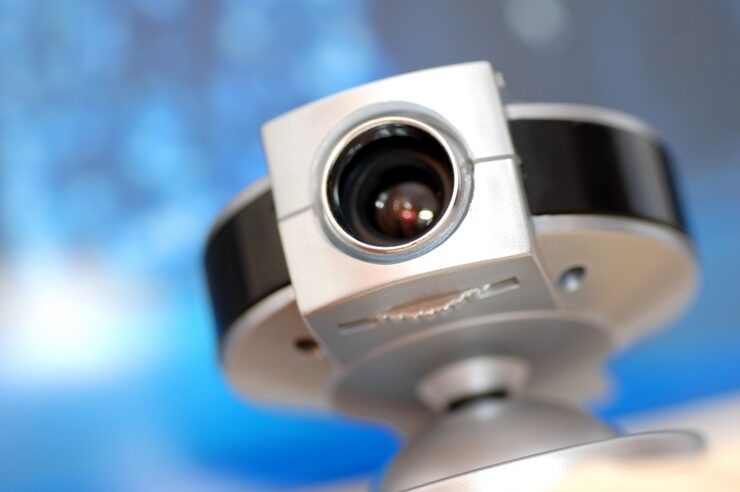
In today’s fast-paced world, security cameras have become an essential part of protecting homes, businesses, and personal property. Whether you want to safeguard your family, monitor deliveries, or oversee a small business, the right HD security camera gives you peace of mind.
Modern security systems offer far more than basic video footage. With high-definition resolution, night vision, motion detection, cloud storage, and remote access via mobile apps, these cameras provide intelligent monitoring that adapts to your lifestyle.
But with so many options on the market, how do you choose the right one? This guide will walk you through key features, comparisons, pros and cons, and expert insights to help you make an informed purchase decision.
What to Consider Before Buying an HD Security Camera
Not all security cameras are the same. Some are designed for outdoor use, while others excel indoors. Some focus on simple monitoring, while others integrate with smart home systems. Here’s what to keep in mind:
1. Video Resolution
- Look for at least 1080p HD resolution for clear and detailed footage.
- Higher resolutions like 2K or 4K provide sharper images, useful for identifying faces or license plates.
2. Field of View (FOV)
- A wider field of view (e.g., 120–160 degrees) allows one camera to cover more area.
- Narrower FOV may be better for focused monitoring of entryways or driveways.
3. Night Vision
- Essential for 24/7 monitoring.
- Choose cameras with infrared (IR) or color night vision for better clarity in low-light environments.
4. Motion Detection & Alerts
- Cameras with smart motion detection reduce false alarms by distinguishing between people, pets, and moving objects.
- Real-time alerts to your phone keep you informed instantly.
5. Storage Options
- Local storage (via microSD card) offers privacy and independence from subscriptions.
- Cloud storage provides convenience and remote access but may require ongoing fees.
6. Power Supply
- Wired cameras provide continuous power but require installation.
- Wireless or battery-powered cameras are easier to install but need recharging.
7. Connectivity
- Wi-Fi-enabled cameras allow for remote access via apps.
- Some systems offer Ethernet connections for more stable performance.
8. Indoor vs Outdoor Use
- Outdoor cameras should be weatherproof (IP65/IP67 rating).
- Indoor cameras often emphasize design and compactness.
9. Smart Home Integration
- If you use smart assistants or automation, check if the camera integrates with those platforms.
Product Summary: Features of Modern HD Security Cameras
Here’s what you can expect from a high-quality security camera in 2025:
- Resolution: Full HD (1080p) or higher (2K, 4K).
- Field of View: Wide-angle coverage up to 160°.
- Night Vision: Infrared or color-enhanced low-light visibility.
- Motion Alerts: Instant push notifications.
- Two-Way Audio: Microphone and speaker for real-time communication.
- Storage: Options for local or cloud recording.
- Durability: Weatherproof design for outdoor use.
- Installation: Flexible wired or wireless options.
| Feature | What It Means for You | Why It Matters |
|---|---|---|
| Full HD Resolution | Clear and sharp video footage | Better identification of people & objects |
| Wide Field of View | Covers more space with fewer cameras | Saves costs & simplifies monitoring |
| Night Vision | Clear footage in darkness | Essential for 24/7 security |
| Motion Detection | Real-time alerts to your phone | Immediate response to activity |
| Two-Way Audio | Communicate remotely | Deter intruders or greet visitors |
| Local/Cloud Storage | Flexible recording options | Balance privacy & convenience |
| Weatherproof Build | Reliable outdoor performance | Long-term durability |
| Smart Integration | Voice control & automation | Adds convenience to your smart home |
Pros & Cons of HD Security Cameras
✅ Pros
- High-definition footage for reliable identification.
- Remote access from anywhere using smartphones.
- Motion detection & alerts for proactive security.
- Two-way audio allows interaction.
- Scalable systems — add multiple cameras as needed.
- Durable outdoor options for all-weather monitoring.
❌ Cons
- Subscription costs for cloud storage with some models.
- Installation effort required for wired systems.
- Battery recharging needed for wireless cameras.
- Privacy concerns if not secured with strong passwords and encryption.
Who It’s Best For
🏠 Homeowners
- Protect entrances, driveways, and backyards.
- Monitor deliveries or unexpected visitors.
🏢 Small Business Owners
- Secure inventory, offices, and storefronts.
- Gain visibility even when away from the workplace.
👪 Families
- Check in on children or elderly relatives.
- Use indoor cameras as baby or pet monitors.
🚗 Vehicle Owners
- Monitor driveways or garages to deter theft and vandalism.
Comparing Different Types of Security Cameras
| Type of Camera | Pros | Cons | Best For |
|---|---|---|---|
| Indoor HD Camera | Compact, discreet, affordable | Limited to indoor use | Families, apartments |
| Outdoor HD Camera | Weatherproof, wide coverage | Higher cost, installation needed | Homes, businesses |
| Wireless HD Camera | Easy setup, flexible placement | Battery recharge needed | Renters, temporary setups |
| Wired HD Camera | Continuous power, stable connection | Installation complexity | Businesses, permanent solutions |
| PTZ Camera | Pan, tilt, zoom coverage | Expensive, may need pro setup | Large properties, parking lots |
FAQs About HD Security Cameras
Q1. Do HD security cameras need Wi-Fi?
Not always. Wired systems can work independently, but Wi-Fi enables remote access and mobile alerts.
Q2. How long is footage stored?
Local storage depends on the size of the memory card. Cloud storage varies by plan.
Q3. Can I install a camera myself?
Yes. Wireless cameras are usually DIY-friendly, while wired systems may require professional installation.
Q4. Do they work during power outages?
Battery-powered cameras will continue operating. Wired cameras need backup power (UPS) for outages.
Q5. Are HD cameras legal for home use?
Yes, as long as they are installed on your property and do not infringe on others’ privacy.
Expert Insights & Real Experiences
Security experts emphasize that the placement of cameras is as important as the camera itself. For example, positioning an HD camera at eye level near the front door ensures clearer identification than mounting it too high.
A small business owner shared:
“Switching from standard definition to HD cameras was a turning point. The clarity of footage improved evidence collection, and remote monitoring gave me peace of mind even when traveling.”
A parent noted:
“Our indoor HD camera doubles as a baby monitor. The two-way audio lets us soothe our child without entering the room, and night vision provides a perfect view.”
Final Recommendation
If you’re investing in security for your home or business, a camera HD security camera is a reliable and effective choice.
It combines:
- Clear footage with high-definition resolution.
- Round-the-clock monitoring with night vision.
- Proactive security with motion alerts.
- Flexibility through storage and installation options.
Whether you’re a homeowner, renter, or business professional, an HD security camera strengthens your safety net.
Key Takeaways
- Choose 1080p or higher resolution for clear images.
- Consider field of view and night vision for complete coverage.
- Decide between wired or wireless setups based on your needs.
- Look for motion alerts and two-way audio for real-time control.
- Balance local vs cloud storage for convenience and privacy.
With the right HD security camera, you’ll always have an extra set of eyes protecting what matters most.
Latest Post
- Smart Cleanup: Buying Guide for Vacuum Cleaners
 Keeping a home clean is easier when you have a vacuum cleaner that matches your lifestyle, floor type, pets, and cleaning routine. The challenge? There are dozens of styles, power levels, and features—making it confusing to know which one is worth your money. This guide breaks down everything you need to make an informed choice,… Read more: Smart Cleanup: Buying Guide for Vacuum Cleaners
 - Smart Cleanup: Buying Guide for Vacuum Cleaners
 Keeping a home clean is easier when you have a vacuum cleaner that matches your lifestyle, floor type, pets, and cleaning routine. The challenge? There are dozens of styles, power levels, and features—making it confusing to know which one is worth your money. This guide breaks down everything you need to make an informed choice,… Read more: Smart Cleanup: Buying Guide for Vacuum Cleaners
 - Smart Cleanup: Buying Guide for Vacuum Cleaners
 Keeping a home clean is easier when you have a vacuum cleaner that matches your lifestyle, floor type, pets, and cleaning routine. The challenge? There are dozens of styles, power levels, and features—making it confusing to know which one is worth your money. This guide breaks down everything you need to make an informed choice,… Read more: Smart Cleanup: Buying Guide for Vacuum Cleaners
 - Fresh Squeeze: The Ultimate Juicer Buying Guide
 Fresh juice is more than a drink—it’s a lifestyle choice. Whether it’s bright morning orange juice, green detox blends, sugar-free fruit mixes for kids, or post-workout vegetable juice, a juicer turns everyday produce into something energizing, healthy, and refreshing. But not all juicers are created equal. Some extract more juice but work slowly. Others are… Read more: Fresh Squeeze: The Ultimate Juicer Buying Guide
 - Smart Cleanup: Buying Guide for Vacuum CleanersDIFFULL Cordless Vacuum Cleaner, 600W 50KPA 70Mins Vacuum Cleaners for Home, Stick Vacuum with 1.8L Cup, Anti-Tangle, 8-Stage Filter System, Green Light for Pet Hair, Carpet, Floor As an Amazon Associate, I earn from qualifying purchases Keeping a home clean is easier when you have a vacuum cleaner that matches your lifestyle, floor type, pets,… Read more: Smart Cleanup: Buying Guide for Vacuum Cleaners
- Foam Magic: The Ultimate Electric Milk Frother Buying Guide
 Making café-style drinks at home has never been easier. Whether it’s a creamy cappuccino, silky latte, hot chocolate, dalgona coffee, or even protein shakes, one simple tool transforms average beverages into café-quality: the electric milk frother. The right milk frother isn’t just for coffee fans—it’s useful for tea lovers, matcha drinkers, hot cocoa fans, and… Read more: Foam Magic: The Ultimate Electric Milk Frother Buying Guide
 - Smart Cuts: The Ultimate Vegetable Cutting Board Guide
 When people think about improving their kitchen, they often picture high-end knives, nonstick pans, or stylish storage. But in everyday cooking—chopping onions, slicing tomatoes, dicing herbs—nothing gets used more than a cutting board, especially for vegetables. The right board keeps knives sharp, protects countertops, improves hygiene, and makes chopping faster and more enjoyable. Yet many… Read more: Smart Cuts: The Ultimate Vegetable Cutting Board Guide
 - How to Choose the Right Security Camera for Your Home
 Projectors have evolved from bulky classroom machines into sleek home-theater and business essentials. Today, whether you want movie nights, gaming on a giant screen, presentations for work, outdoor cinema in the backyard, or educational content for kids, a projector can transform a space in a way no TV can. However, buying one isn’t simple. The… Read more: How to Choose the Right Security Camera for Your Home
 - Stay Safe: Everything You Need to Know About Security Cameras
 Projectors have evolved from bulky classroom machines into sleek home-theater and business essentials. Today, whether you want movie nights, gaming on a giant screen, presentations for work, outdoor cinema in the backyard, or educational content for kids, a projector can transform a space in a way no TV can. However, buying one isn’t simple. The… Read more: Stay Safe: Everything You Need to Know About Security Cameras
 - Secure Your Space – Smart Tips for Choosing a Security Camera
 Projectors have evolved from bulky classroom machines into sleek home-theater and business essentials. Today, whether you want movie nights, gaming on a giant screen, presentations for work, outdoor cinema in the backyard, or educational content for kids, a projector can transform a space in a way no TV can. However, buying one isn’t simple. The… Read more: Secure Your Space – Smart Tips for Choosing a Security Camera
 - Sleep Right: Mattress Buying Guide
 Choosing a mattress sounds simple—until you shop for one. Online stores and furniture showrooms are filled with options: memory foam, hybrid, innerspring, cooling gel, soft, firm, and adjustable. Many claim to improve your sleep, align your spine, or keep you cool, but which mattress actually fits your needs? This helpful buying guide explains how mattresses… Read more: Sleep Right: Mattress Buying Guide
 - Smart Playtime: Buying Guide for Baby Toys
 BEZGAR HQ089 RC Plane, Drones for Kids, 6-axis Gyro Remote Control Airplane, RC Helicopter, Easy Control for Beginners Toys with Colorful LED Navigation Lights As an Amazon Associate, I earn from qualifying purchases Choosing the right baby toy feels simple—until you start shopping. Suddenly, there are hundreds of options claiming to boost learning, improve motor… Read more: Smart Playtime: Buying Guide for Baby Toys
 - Smart Cleanup: Buying Guide for Vacuum CleanersDzaki Cordless Vacuum Cleaner, Stick Vacuum with Smart LED Display, 50KPA 55Mins Vacuum Cleaners for Home, Powerful Suction, Anti-Tangled Lightweight Rechargeable Vac for Pet Hair, Carpet, Hard Floor As an Amazon Associate, I earn from qualifying purchases Keeping a home clean is easier when you have a vacuum cleaner that matches your lifestyle, floor type,… Read more: Smart Cleanup: Buying Guide for Vacuum Cleaners
- Winter Warmth: Buying Guide for the Perfect Winter Jacket
 Rrtizan Heated Vest for Men, 12 Heating Zones 3 Temp Levels, 10000mAh Battery USB-C, Waterproof for Hiking(0086, XL) As an Amazon Associate, I earn from qualifying purchases A winter jacket is not just a seasonal purchase—it’s an investment in warmth, comfort, and durability. Whether you live in a snowy region, commute to school or work… Read more: Winter Warmth: Buying Guide for the Perfect Winter Jacket
 - Safe Space: Buying Guide for Large Baby Playpen
 ZEEBABA Extra Large Baby Playpen – 59x69in Play Yard for Babies & Toddlers, Indoor Play Pen with Breathable Mesh and Gate, Parc pour Bébé (Without Mat) As an Amazon Associate, I earn from qualifying purchases A baby playpen is more than a gated space—it’s a safe zone where little ones can explore, crawl, stand, and… Read more: Safe Space: Buying Guide for Large Baby Playpen