

As an Amazon Associate, I earn from qualifying purchases
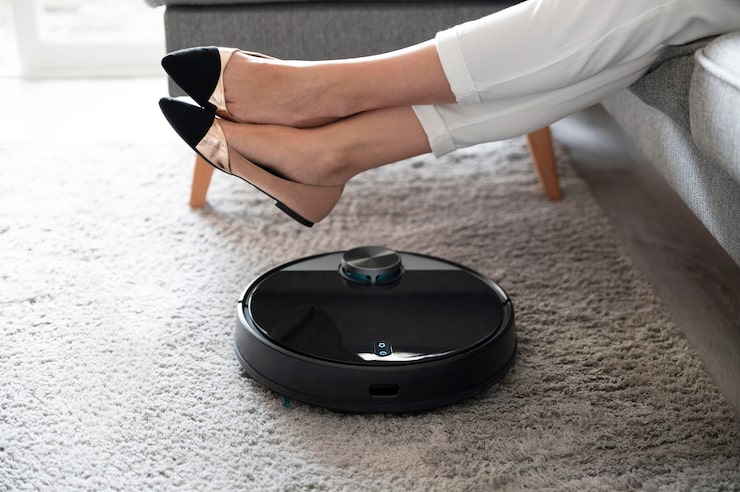
Technology has revolutionized the way we clean our homes. Among the most innovative household tools, the robotic vacuum stands out as a symbol of convenience, efficiency, and smart living. Designed to work autonomously, these small yet powerful devices roam around your floors, removing dust, debris, and pet hair with minimal human input.
For busy individuals, parents, or anyone who values time-saving solutions, robotic vacuums are game-changers. But with dozens of models on the market—each offering unique features like mapping technology, automatic emptying, and smart home integration—choosing the right one can be overwhelming.
This comprehensive buying guideline for robotic vacuums will walk you through every consideration: from suction power to navigation systems, surface compatibility, and maintenance tips. Whether you live in a small apartment or a large house, you’ll find all the insights you need to make a confident, well-informed purchase.
What to Consider Before Buying a Robotic Vacuum
Not all robotic vacuums are created equal. The ideal one depends on your home layout, floor type, and cleaning needs. Let’s break down the key factors to help you make a smart decision.
1. Suction Power and Cleaning Performance
The most critical feature of any vacuum is its suction power — the force that lifts dirt and debris from your floors.
- Measured in Pascals (Pa): Most robotic vacuums range between 1,500 and 5,000 Pa.
- Low suction (1,500–2,000 Pa): Suitable for hard floors and light debris.
- High suction (3,000–5,000 Pa): Ideal for carpets, pet hair, and heavy messes.
Expert Tip:
Choose a model with adjustable suction levels. This allows the vacuum to automatically increase power when transitioning from hardwood to carpet, improving efficiency and saving battery life.
Real Insight:
In real-world testing, vacuums with over 3,000 Pa suction handled pet hair and cereal crumbs on rugs more effectively, leaving less residue behind.
2. Navigation and Mapping Technology
A robotic vacuum’s intelligence lies in its navigation system. Older models move randomly, while advanced ones use smart sensors and lasers to map your home for efficient cleaning.
| Navigation Type | Description | Best For | Pros | Cons |
|---|---|---|---|---|
| Random Navigation | Moves in random patterns | Small apartments | Budget-friendly | Misses spots |
| Gyroscopic Navigation | Follows systematic paths | Medium spaces | Better coverage | Limited mapping |
| LiDAR (Laser Mapping) | Creates detailed room maps | Large homes | Precise navigation | Higher cost |
| Visual SLAM (Camera Mapping) | Uses cameras to map rooms | Homes with mixed lighting | Avoids obstacles | Requires good lighting |
Expert Opinion:
LiDAR-based models are the most efficient for multi-room homes, while gyroscopic systems offer a solid mid-range option.
Bonus Tip:
If you live in a multi-level home, look for multi-floor mapping support, allowing the robot to remember and adapt to different floor plans.
3. Battery Life and Charging Efficiency
Battery performance determines how much area your robot can clean in one session.
- Runtime: 90–200 minutes, depending on suction level and floor type.
- Charging Time: Typically 3–6 hours.
- Auto-Recharge Feature: The vacuum returns to its dock when low on power and resumes cleaning where it left off.
Consider This:
If your home exceeds 1,000 square feet, opt for a model with at least 120 minutes of runtime.
Expert Insight:
For optimal lifespan, avoid leaving the vacuum docked for weeks without use; batteries perform best with regular charging cycles.
4. Dustbin Capacity and Filtration System
Robotic vacuums have smaller dustbins than traditional vacuums, but modern models compensate with auto-empty docks or high-efficiency filters.
| Feature | Description | Ideal Use |
|---|---|---|
| Standard Dustbin (400–600 ml) | Requires manual emptying | Small homes |
| Auto-Empty Dock | Self-cleans into a large bag | Large homes or pet owners |
| HEPA Filtration | Captures allergens and fine dust | Allergy-prone households |
Pro Tip:
Choose a model with a sealed filtration system if you’re sensitive to dust or have pets. This prevents fine particles from escaping into the air.
Real-World Experience:
HEPA-equipped vacuums noticeably reduce dust accumulation on furniture and improve indoor air quality over time.
5. Floor Type Compatibility
Different floors require different cleaning strengths.
| Floor Type | Recommended Features |
|---|---|
| Hardwood & Tile | Soft brush rollers and moderate suction |
| Carpets & Rugs | High suction power (3,000+ Pa) |
| Mixed Surfaces | Auto-adjusting suction and brush height |
| High-pile Carpet | Specialized brush for deep cleaning |
Note:
If your home has delicate wooden floors, ensure the vacuum’s wheels and brushes are made of soft, non-scratching materials.
6. Smart Connectivity and App Control
Modern robotic vacuums are equipped with Wi-Fi connectivity and mobile app control, allowing users to manage cleaning remotely.
Common App Features Include:
- Real-time mapping and tracking.
- Scheduling cleaning sessions.
- Zone cleaning (specific areas only).
- “No-go” virtual boundaries.
- Voice assistant compatibility (Alexa, Google Home, etc.).
Expert Opinion:
App-controlled models make maintenance far easier, especially when you’re away from home. You can monitor progress, view cleaning history, and even receive notifications when bins are full or brushes need replacement.
7. Noise Level
Most robotic vacuums operate between 55–70 decibels (dB).
- Below 60 dB: Quiet enough for nighttime cleaning.
- 60–70 dB: Average for powerful suction models.
Pro Tip:
If you have pets or infants, look for vacuums with a “quiet mode” to reduce noise during sensitive hours.
8. Maintenance and Longevity
To get the most out of your robotic vacuum, consider how easy it is to maintain.
Maintenance Checklist:
- Empty dustbin after every few uses.
- Clean filters weekly; replace every 3–6 months.
- Wipe sensors to maintain navigation accuracy.
- Remove tangled hair from brushes regularly.
Durability Tip:
Look for vacuums with modular designs — this makes replacing brushes, wheels, or sensors easier without professional service.
9. Size, Height, and Mobility
Compact robots (under 3 inches tall) can glide under furniture easily. However, models with LiDAR towers may require slightly higher clearance.
If you have low sofas or beds, measure clearance before buying to ensure the vacuum fits comfortably underneath.
10. Price vs. Features
Price often reflects smart features and suction performance.
| Price Range | Features You Can Expect |
|---|---|
| Budget ($100–$250) | Random navigation, limited suction, basic sensors |
| Mid-Range ($250–$600) | Smart mapping, app control, HEPA filters |
| Premium ($700+) | LiDAR mapping, self-emptying dock, voice control, AI obstacle avoidance |
Expert Advice:
A mid-range robotic vacuum offers the best value for most homes — powerful enough for daily cleaning without breaking the bank.
Product Summary: Main Types of Robotic Vacuums
| Type | Description | Ideal For | Strength | Limitation |
|---|---|---|---|---|
| Basic Robot Vacuum | Random movement, limited sensors | Small apartments | Affordable | Misses spots |
| Smart Mapping Vacuum | Uses gyroscope or camera | Medium to large homes | Efficient coverage | Moderate price |
| LiDAR Vacuum | Laser navigation, detailed maps | Multi-room homes | Precise and smart | Higher cost |
| Hybrid Vacuum + Mop | Vacuums and mops simultaneously | Hard floor homes | Multi-function | Requires more maintenance |
| Self-Emptying Robot | Auto-cleans its bin | Large families, pet owners | Hands-free convenience | Premium price |
Pros and Cons of Robotic Vacuums
Pros
- Hands-Free Cleaning: Ideal for busy lifestyles.
- Smart Navigation: Maps and cleans systematically.
- Compact Design: Fits under furniture easily.
- Scheduled Cleaning: Operates automatically, even when you’re away.
- Multi-Surface Compatibility: Works on wood, tiles, and carpets.
- Low Noise Levels: Quieter than traditional vacuums.
Cons
- Small Dustbin: Needs frequent emptying (unless self-emptying).
- May Miss Corners: Round shape can limit edge cleaning.
- High Cost for Premium Models: Smart features add to price.
- Requires Maintenance: Brushes and sensors need regular cleaning.
Who It’s Best For
- Busy Professionals: Keeps the home clean with minimal effort.
- Pet Owners: Great for managing fur and dander.
- Allergy Sufferers: HEPA filters improve air quality.
- Parents: Safe, quiet, and automated for daily upkeep.
- Tech Enthusiasts: Integrates easily with smart home ecosystems.
- Elderly Users: Reduces physical strain of traditional vacuuming.
Real-World Use Cases and Insights
1. Daily Cleaning Automation
A robotic vacuum can clean your floors while you’re at work or asleep.
User Insight: Scheduling daily runs drastically reduces the accumulation of dust, especially in high-traffic areas.
2. Pet Hair Management
Pet owners find robotic vacuums invaluable for constant fur shedding.
Personal Experience: Models with rubberized brush rolls handle long pet hair without tangling — a major upgrade over older designs.
3. Apartment vs. House
For small apartments, compact models with random navigation are sufficient. In larger homes, smart mapping ensures complete coverage and efficient battery use.
4. Allergy Reduction
HEPA filters and regular vacuuming reduce allergens by up to 50%, based on cleaning research from home hygiene specialists.
Comparison: Robotic Vacuum vs. Traditional Vacuum
| Feature | Robotic Vacuum | Traditional Vacuum |
|---|---|---|
| Convenience | Fully automated | Manual operation |
| Coverage | Good for flat areas | Excellent for corners and stairs |
| Maintenance | Minimal (auto-empty optional) | Frequent cleaning |
| Price | Higher upfront | Lower upfront |
| Noise | Low to medium | Medium to high |
| Ideal Use | Everyday light cleaning | Deep cleaning sessions |
Conclusion:
Robotic vacuums are excellent for maintaining cleanliness between deep cleans. Many homeowners now use both: the robot for daily upkeep, and a traditional vacuum for occasional heavy-duty cleaning.
Practical Tips for Better Performance
- Clear the Floor: Remove cords, toys, or obstacles before running the vacuum.
- Schedule Cleanings: Automate daily sessions to keep dirt from building up.
- Empty Dustbin Regularly: Prevents clogs and maintains suction.
- Wipe Sensors Weekly: Keeps navigation accurate.
- Check Brush Roll: Remove hair or string that can reduce efficiency.
- Use Virtual Barriers: Prevent the vacuum from entering unwanted areas.
- Map Setup Carefully: Let it complete a full run initially to create accurate maps.
Maintenance and Care Tips
- Monthly Filter Cleaning: Rinse with water and let dry completely before reuse.
- Replace Brushes Every 6–12 Months: Depending on usage and floor type.
- Battery Maintenance: Keep docked when not in use; avoid overcharging.
- Software Updates: Regular firmware updates often improve navigation and efficiency.
- Storage: Store in a cool, dry space when not used for long periods.
Expert Opinions and Research Insights
- Cleaning Experts highlight that robotic vacuums reduce manual cleaning time by up to 75%, especially for pet owners.
- Home Automation Researchers suggest LiDAR mapping and AI-driven obstacle detection significantly improve performance over random navigation models.
- User Studies show that households using robotic vacuums daily reported cleaner air, reduced dust on furniture, and fewer allergy symptoms.
Common Mistakes to Avoid
| Mistake | Effect | Solution |
|---|---|---|
| Running on cluttered floors | Missed spots, navigation errors | Clear obstacles before cleaning |
| Ignoring maintenance | Reduced suction | Clean brushes and sensors weekly |
| Skipping firmware updates | Missed new features | Update via app regularly |
| Using on wet floors | Damage to sensors | Only clean dry surfaces |
| Expecting deep carpet cleaning | Disappointment | Use for maintenance, not heavy-duty jobs |
Frequently Asked Questions (FAQs)
Q1: Can robotic vacuums replace traditional vacuums?
Not entirely — they’re best for maintenance cleaning between deep clean sessions.
Q2: How often should I run my robot vacuum?
For best results, run it daily or every other day in high-traffic areas.
Q3: Do they work on dark floors or rugs?
Yes, but models with infrared sensors may struggle on very dark surfaces. LiDAR models handle this better.
Q4: Can they handle stairs?
No. They have cliff sensors to prevent falling but cannot climb stairs.
Q5: Are they safe for pets?
Completely safe — modern models operate quietly and avoid moving animals.
Q6: How long do they last?
Typically 3–5 years, depending on maintenance and usage.
General Product Comparison Table
| Feature | Basic Model | Smart Mapping Model | Self-Emptying Model | Hybrid (Vacuum + Mop) |
|---|---|---|---|---|
| Navigation | Random | LiDAR or camera | LiDAR | Smart mapping |
| Runtime | 90 min | 150 min | 180 min | 120 min |
| Dustbin | Manual | Manual | Auto-empty | Manual |
| Ideal For | Small homes | Large homes | Pet owners | Hard floors |
| Price | Low | Mid | High | Mid |
Final Recommendation
If you’re ready to bring automation into your home cleaning routine, a robotic vacuum is an excellent investment.
- For small apartments, a basic or gyroscopic model offers affordable convenience.
- For larger homes or pet owners, LiDAR or self-emptying vacuums provide superior efficiency and autonomy.
- For mixed-surface floors, consider a hybrid vacuum and mop model for all-in-one cleaning.
A well-chosen robotic vacuum will not only save time but also maintain a cleaner and healthier living environment — all with the push of a button.
Conclusion: Cleaning Smarter, Living Better
The robotic vacuum represents the evolution of home cleaning — smart, hands-free, and incredibly efficient. It adapts to your home, learns your routines, and ensures spotless floors every day with minimal effort.
In a world where time is precious, investing in a quality robotic vacuum means investing in a cleaner, healthier, and more convenient lifestyle.
So, choose wisely, set it up, and let your robotic assistant handle the dirt — while you focus on the things that truly matter.
Latest Post
- Smart Cleanup: Buying Guide for Vacuum Cleaners
 Keeping a home clean is easier when you have a vacuum cleaner that matches your lifestyle, floor type, pets, and cleaning routine. The challenge? There are dozens of styles, power levels, and features—making it confusing to know which one is worth your money. This guide breaks down everything you need to make an informed choice,… Read more: Smart Cleanup: Buying Guide for Vacuum Cleaners
 - Smart Cleanup: Buying Guide for Vacuum Cleaners
 Keeping a home clean is easier when you have a vacuum cleaner that matches your lifestyle, floor type, pets, and cleaning routine. The challenge? There are dozens of styles, power levels, and features—making it confusing to know which one is worth your money. This guide breaks down everything you need to make an informed choice,… Read more: Smart Cleanup: Buying Guide for Vacuum Cleaners
 - Smart Cleanup: Buying Guide for Vacuum Cleaners
 Keeping a home clean is easier when you have a vacuum cleaner that matches your lifestyle, floor type, pets, and cleaning routine. The challenge? There are dozens of styles, power levels, and features—making it confusing to know which one is worth your money. This guide breaks down everything you need to make an informed choice,… Read more: Smart Cleanup: Buying Guide for Vacuum Cleaners
 - Fresh Squeeze: The Ultimate Juicer Buying Guide
 Fresh juice is more than a drink—it’s a lifestyle choice. Whether it’s bright morning orange juice, green detox blends, sugar-free fruit mixes for kids, or post-workout vegetable juice, a juicer turns everyday produce into something energizing, healthy, and refreshing. But not all juicers are created equal. Some extract more juice but work slowly. Others are… Read more: Fresh Squeeze: The Ultimate Juicer Buying Guide
 - Smart Cleanup: Buying Guide for Vacuum CleanersDIFFULL Cordless Vacuum Cleaner, 600W 50KPA 70Mins Vacuum Cleaners for Home, Stick Vacuum with 1.8L Cup, Anti-Tangle, 8-Stage Filter System, Green Light for Pet Hair, Carpet, Floor As an Amazon Associate, I earn from qualifying purchases Keeping a home clean is easier when you have a vacuum cleaner that matches your lifestyle, floor type, pets,… Read more: Smart Cleanup: Buying Guide for Vacuum Cleaners
- Foam Magic: The Ultimate Electric Milk Frother Buying Guide
 Making café-style drinks at home has never been easier. Whether it’s a creamy cappuccino, silky latte, hot chocolate, dalgona coffee, or even protein shakes, one simple tool transforms average beverages into café-quality: the electric milk frother. The right milk frother isn’t just for coffee fans—it’s useful for tea lovers, matcha drinkers, hot cocoa fans, and… Read more: Foam Magic: The Ultimate Electric Milk Frother Buying Guide
 - Smart Cuts: The Ultimate Vegetable Cutting Board Guide
 When people think about improving their kitchen, they often picture high-end knives, nonstick pans, or stylish storage. But in everyday cooking—chopping onions, slicing tomatoes, dicing herbs—nothing gets used more than a cutting board, especially for vegetables. The right board keeps knives sharp, protects countertops, improves hygiene, and makes chopping faster and more enjoyable. Yet many… Read more: Smart Cuts: The Ultimate Vegetable Cutting Board Guide
 - How to Choose the Right Security Camera for Your Home
 Projectors have evolved from bulky classroom machines into sleek home-theater and business essentials. Today, whether you want movie nights, gaming on a giant screen, presentations for work, outdoor cinema in the backyard, or educational content for kids, a projector can transform a space in a way no TV can. However, buying one isn’t simple. The… Read more: How to Choose the Right Security Camera for Your Home
 - Stay Safe: Everything You Need to Know About Security Cameras
 Projectors have evolved from bulky classroom machines into sleek home-theater and business essentials. Today, whether you want movie nights, gaming on a giant screen, presentations for work, outdoor cinema in the backyard, or educational content for kids, a projector can transform a space in a way no TV can. However, buying one isn’t simple. The… Read more: Stay Safe: Everything You Need to Know About Security Cameras
 - Secure Your Space – Smart Tips for Choosing a Security Camera
 Projectors have evolved from bulky classroom machines into sleek home-theater and business essentials. Today, whether you want movie nights, gaming on a giant screen, presentations for work, outdoor cinema in the backyard, or educational content for kids, a projector can transform a space in a way no TV can. However, buying one isn’t simple. The… Read more: Secure Your Space – Smart Tips for Choosing a Security Camera
 - Sleep Right: Mattress Buying Guide
 Choosing a mattress sounds simple—until you shop for one. Online stores and furniture showrooms are filled with options: memory foam, hybrid, innerspring, cooling gel, soft, firm, and adjustable. Many claim to improve your sleep, align your spine, or keep you cool, but which mattress actually fits your needs? This helpful buying guide explains how mattresses… Read more: Sleep Right: Mattress Buying Guide
 - Smart Playtime: Buying Guide for Baby Toys
 BEZGAR HQ089 RC Plane, Drones for Kids, 6-axis Gyro Remote Control Airplane, RC Helicopter, Easy Control for Beginners Toys with Colorful LED Navigation Lights As an Amazon Associate, I earn from qualifying purchases Choosing the right baby toy feels simple—until you start shopping. Suddenly, there are hundreds of options claiming to boost learning, improve motor… Read more: Smart Playtime: Buying Guide for Baby Toys
 - Smart Cleanup: Buying Guide for Vacuum CleanersDzaki Cordless Vacuum Cleaner, Stick Vacuum with Smart LED Display, 50KPA 55Mins Vacuum Cleaners for Home, Powerful Suction, Anti-Tangled Lightweight Rechargeable Vac for Pet Hair, Carpet, Hard Floor As an Amazon Associate, I earn from qualifying purchases Keeping a home clean is easier when you have a vacuum cleaner that matches your lifestyle, floor type,… Read more: Smart Cleanup: Buying Guide for Vacuum Cleaners
- Winter Warmth: Buying Guide for the Perfect Winter Jacket
 Rrtizan Heated Vest for Men, 12 Heating Zones 3 Temp Levels, 10000mAh Battery USB-C, Waterproof for Hiking(0086, XL) As an Amazon Associate, I earn from qualifying purchases A winter jacket is not just a seasonal purchase—it’s an investment in warmth, comfort, and durability. Whether you live in a snowy region, commute to school or work… Read more: Winter Warmth: Buying Guide for the Perfect Winter Jacket
 - Safe Space: Buying Guide for Large Baby Playpen
 ZEEBABA Extra Large Baby Playpen – 59x69in Play Yard for Babies & Toddlers, Indoor Play Pen with Breathable Mesh and Gate, Parc pour Bébé (Without Mat) As an Amazon Associate, I earn from qualifying purchases A baby playpen is more than a gated space—it’s a safe zone where little ones can explore, crawl, stand, and… Read more: Safe Space: Buying Guide for Large Baby Playpen