

As an Amazon Associate, I earn from qualifying purchases
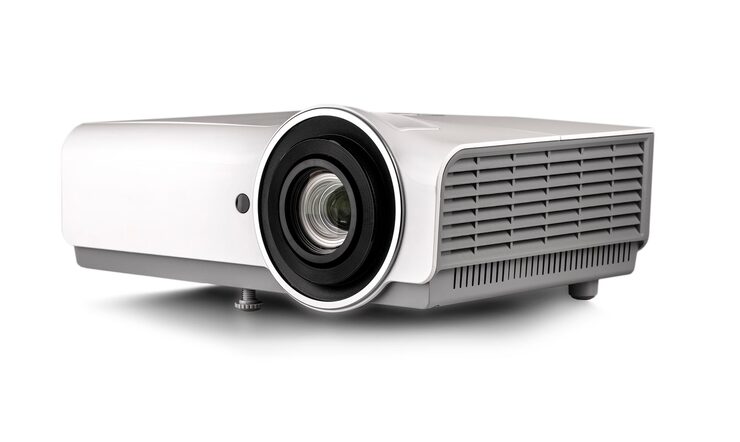
Projectors have evolved from bulky, business-only devices to sleek, high-definition home entertainment systems, classroom aids, and portable outdoor companions. Whether you’re transforming your living room into a mini theater or setting up a projector for professional presentations, the right model can elevate your visual experience to a whole new level.
In this complete buying guide, we’ll explore everything you need to know before purchasing a projector — including resolution, brightness, contrast, connectivity, throw distance, and much more. You’ll also learn how to match a projector’s specifications to your unique needs, budget, and space.
Why Choosing the Right Projector Matters
Buying a projector isn’t just about getting the biggest screen possible — it’s about finding a device that fits your purpose. A poor-quality projector can ruin a movie night with dim images, distorted colors, or loud fan noise. On the other hand, a carefully chosen one can deliver cinematic brilliance and long-term reliability.
Different users have different needs:
- Home theater enthusiasts crave deep blacks, vibrant colors, and quiet operation.
- Gamers need fast refresh rates and low input lag.
- Business users prioritize brightness and portability.
- Educators look for durable, easy-to-use models that work well in well-lit classrooms.
So, let’s break down how to find the perfect match.
What to Consider Before Buying a Projector
When evaluating projectors, several key factors determine quality and usability. Understanding each one helps you make an informed purchase.
1. Resolution and Image Quality
Resolution refers to the number of pixels the projector can display. The higher the resolution, the sharper and more detailed the image.
| Resolution | Description | Best Use Case |
|---|---|---|
| SVGA (800×600) | Basic clarity | Presentations, spreadsheets |
| XGA (1024×768) | Standard definition | Classrooms, offices |
| HD (1280×720) | Entry-level HD | Movies on a budget |
| Full HD (1920×1080) | Excellent detail | Home theaters, gaming |
| 4K (3840×2160) | Ultra-high definition | Premium cinema experience |
Tip: If you’re primarily using your projector for movies or gaming, go for Full HD or 4K. For simple presentations, lower resolutions can suffice.
2. Brightness (Lumens)
Brightness, measured in ANSI lumens, determines how well the image performs in different lighting conditions.
- Under 1,000 lumens: Suitable for dark rooms.
- 1,000–2,500 lumens: Works well for moderate lighting.
- 2,500–4,000 lumens: Great for bright rooms or outdoor settings.
- Above 4,000 lumens: Best for large venues or daylight projection.
Personal insight: I once used a 1,200-lumen projector in my living room, and while the picture was fine at night, it completely washed out during the day. Upgrading to a 3,000-lumen model solved that instantly.
3. Contrast Ratio
Contrast ratio measures the difference between the darkest black and the brightest white the projector can produce. A higher contrast ratio means deeper blacks and more vibrant colors — especially noticeable in dark movie scenes.
- Basic projectors: 500:1 to 2,000:1
- Mid-range models: 10,000:1 to 50,000:1
- High-end models: 100,000:1 and above
For cinematic viewing, a contrast ratio of at least 10,000:1 is recommended.
4. Throw Distance and Screen Size
Throw distance is how far the projector needs to be from the screen to create a specific image size.
| Projector Type | Throw Ratio | Ideal Use |
|---|---|---|
| Standard Throw | 1.5–2.5:1 | Living rooms, classrooms |
| Short Throw | 0.5–1.0:1 | Small rooms |
| Ultra Short Throw | <0.4:1 | Tight spaces, wall-mounted setups |
If your room is small, consider a short-throw or ultra-short-throw projector to get a large image without needing several feet of distance.
5. Portability and Size
Projectors range from pocket-sized portable units to large, fixed home theater systems.
- Mini projectors: Lightweight, travel-friendly, great for casual use.
- Standard projectors: Offer better quality and performance for home or office.
- Professional projectors: Designed for large venues, events, or installations.
If you plan to use your projector in multiple locations, portability should be a top priority.
6. Light Source: Lamp vs. LED vs. Laser
The type of light source affects brightness, color accuracy, and maintenance.
| Light Source | Lifespan | Pros | Cons |
|---|---|---|---|
| Lamp | 3,000–6,000 hours | Affordable, bright | Requires replacements |
| LED | 20,000+ hours | Energy-efficient, compact | Lower brightness |
| Laser | 20,000–30,000 hours | Instant on/off, bright | Higher cost |
Laser projectors are gaining popularity for their long life and consistent performance, though LED models offer a balance between quality and affordability.
7. Connectivity Options
Modern projectors support multiple connection types to accommodate various devices.
- HDMI: The most common and delivers high-quality video and audio.
- USB: For media playback or firmware updates.
- VGA: Older format for PCs and legacy devices.
- Wi-Fi or Bluetooth: Enables wireless streaming and screen mirroring.
- Audio Out (3.5mm or Optical): For connecting external speakers.
If you plan to stream content directly from a smartphone or laptop, look for wireless projection or screen mirroring compatibility.
8. Sound Quality
While most projectors include built-in speakers, these are usually insufficient for an immersive experience. For movie nights or large rooms, pair your projector with external speakers or a soundbar. However, if portability is your goal, choose a projector with decent integrated audio.
9. Noise Level
Fan noise can be distracting during quiet movie scenes. A good projector should operate below 30 decibels (dB) for minimal disturbance. Check user reviews or specifications for this detail before buying.
10. Maintenance and Lamp Replacement Costs
Projectors require occasional maintenance, especially those with traditional lamps. Make sure replacement parts (like filters or lamps) are easy to find and reasonably priced. LED and laser projectors, while pricier upfront, save money in the long run due to minimal upkeep.
Comparing Projector Types
There are three main projection technologies: DLP, LCD, and LCoS. Each has strengths and trade-offs.
| Technology | Image Quality | Pros | Cons |
|---|---|---|---|
| DLP (Digital Light Processing) | Sharp and bright | Compact, less blur | Rainbow effect possible |
| LCD (Liquid Crystal Display) | Vivid and color-accurate | Great for presentations | Bulky design |
| LCoS (Liquid Crystal on Silicon) | Premium visuals | Best contrast and color | Expensive |
For most home users, DLP and LCD models strike the right balance between price and performance.
Special Features to Look For
Modern projectors come packed with convenient features that enhance usability.
1. Keystone Correction
Adjusts image shape when the projector isn’t perfectly aligned with the screen.
- Manual Keystone: You adjust it physically.
- Auto Keystone: The projector corrects distortion automatically.
2. Lens Shift
Allows you to move the projected image vertically or horizontally without repositioning the projector — ideal for ceiling mounts or off-center setups.
3. Smart Functionality
Built-in apps and Wi-Fi connectivity enable streaming platforms, screen casting, and voice control, eliminating the need for external devices.
4. 3D Compatibility
If you enjoy 3D movies, look for a model that supports active or passive 3D formats.
5. HDR (High Dynamic Range)
Enhances color and contrast for a richer, more lifelike picture — especially useful in 4K projectors.
Projector Use Cases
1. Home Theater
For movie enthusiasts, prioritize:
- Full HD or 4K resolution
- High contrast ratio
- Quiet operation
- HDMI and audio output ports
Set up in a darkened room with a quality projection screen for the best results.
2. Business or Classroom Use
Ideal projectors for presentations should include:
- High brightness (3,000+ lumens) for clear images in well-lit spaces
- Portability for easy transport between rooms
- Simple setup with plug-and-play functionality
3. Gaming
Gamers should look for:
- Low input lag (<16 ms)
- Fast refresh rates
- Full HD or 4K resolution
- Brightness suitable for both day and night use
4. Outdoor Movie Nights
Outdoor settings require:
- High brightness (3,000–5,000 lumens)
- Sturdy build or mounting options
- Portable power source (for cordless models)
- Weather protection if used outside frequently
5. Art and Design
For artists, designers, and crafters:
- High color accuracy and resolution
- Easy-to-adjust focus and throw distance
- Lightweight for repositioning on easels or walls
Pros and Cons of Using a Projector
| Pros | Cons |
|---|---|
| Larger screen size than TVs | Needs dim lighting for best results |
| Portable and space-saving | Lamps may need replacement |
| Ideal for movies, gaming, presentations | Built-in speakers often weak |
| Immersive viewing experience | Requires a proper surface or screen |
| Cost-effective for large displays | Fan noise in some models |
Who It’s Best For
- Movie Lovers: For creating a personal cinema at home.
- Professionals: For sharp presentations or training sessions.
- Educators: For interactive and large-scale classroom displays.
- Gamers: For immersive large-screen gameplay.
- Families: For backyard movie nights and gatherings.
- Artists and DIY Creators: For tracing, projecting designs, or visual installations.
Tips for Getting the Best Projection Quality
- Use a Projection Screen – A dedicated screen provides better color reflection and brightness than plain walls.
- Control Ambient Light – Dim lights or use blackout curtains to enhance contrast.
- Adjust the Focus – Ensure the image is sharp by manually fine-tuning focus settings.
- Calibrate the Colors – Many projectors have preset modes like Cinema, Sports, or Dynamic; test them to find the best fit.
- Keep It Clean – Regularly wipe the lens with a microfiber cloth and clean air filters.
- Optimize Placement – Follow manufacturer guidelines for throw distance and alignment.
Frequently Asked Questions (FAQs)
1. What is the ideal resolution for home use?
For home theaters or gaming, Full HD (1080p) or 4K resolution is ideal. For occasional presentations, 720p or XGA is usually sufficient.
2. How long does a projector lamp last?
Lamp-based projectors typically last 3,000 to 6,000 hours. LED or laser models can exceed 20,000 hours.
3. Can I use a projector during the day?
Yes, but choose one with at least 3,000 lumens for bright environments.
4. Do I need a screen?
A screen is recommended because it improves image brightness and color accuracy compared to a painted wall.
5. What size image can I project?
Most projectors can display between 40–300 inches, depending on throw distance and model.
6. Are portable projectors worth it?
Yes, if you value mobility and convenience. However, they may not match the brightness or resolution of larger models.
7. How do I connect my phone or laptop?
Most projectors support HDMI, USB, or wireless casting. Some models also feature Bluetooth for audio connections.
Expert Insights
According to AV industry professionals, the key to choosing a great projector lies in balancing resolution, brightness, and environment. A common mistake buyers make is focusing solely on resolution while ignoring brightness or throw distance.
For example, a 4K projector in a brightly lit room can still produce poor results without adequate lumens. Conversely, a 1080p projector in a dark home theater can look stunning if well-calibrated.
Pro tip: Always test the projector in your actual environment before finalizing your setup — wall color, light conditions, and room size dramatically affect performance.
Final Recommendation
Choosing the right projector means aligning your needs with the right balance of features and price. Here’s a quick summary:
| User Type | Recommended Specs |
|---|---|
| Home Theater Enthusiast | 4K, 2,000+ lumens, high contrast, low noise |
| Business/Office User | 3,000+ lumens, portable, quick setup |
| Gamer | Full HD/4K, low input lag, high refresh rate |
| Outdoor Movie Lover | 3,500+ lumens, wireless, battery or portable power |
| Teacher/Educator | Bright, durable, easy-to-operate, short-throw |
Ultimately, your ideal projector depends on where, when, and how you plan to use it. Always read updated user feedback, check specifications carefully, and compare warranty coverage before buying.
Conclusion
A projector isn’t just a gadget — it’s a gateway to a larger, more immersive viewing experience. From cozy movie nights to dynamic office presentations, the right model can transform any wall into a window of possibility.
By understanding the factors outlined in this guide — brightness, resolution, contrast, connectivity, and purpose — you’ll confidently select a projector that delivers clarity, convenience, and long-term satisfaction.
Whether you’re chasing cinematic perfection or portable practicality, the perfect projector is out there waiting to light up your world — bright, bold, and brilliantly yours.
Latest Post
- Smart Cleanup: Buying Guide for Vacuum Cleaners
 Keeping a home clean is easier when you have a vacuum cleaner that matches your lifestyle, floor type, pets, and cleaning routine. The challenge? There are dozens of styles, power levels, and features—making it confusing to know which one is worth your money. This guide breaks down everything you need to make an informed choice,… Read more: Smart Cleanup: Buying Guide for Vacuum Cleaners
 - Smart Cleanup: Buying Guide for Vacuum Cleaners
 Keeping a home clean is easier when you have a vacuum cleaner that matches your lifestyle, floor type, pets, and cleaning routine. The challenge? There are dozens of styles, power levels, and features—making it confusing to know which one is worth your money. This guide breaks down everything you need to make an informed choice,… Read more: Smart Cleanup: Buying Guide for Vacuum Cleaners
 - Smart Cleanup: Buying Guide for Vacuum Cleaners
 Keeping a home clean is easier when you have a vacuum cleaner that matches your lifestyle, floor type, pets, and cleaning routine. The challenge? There are dozens of styles, power levels, and features—making it confusing to know which one is worth your money. This guide breaks down everything you need to make an informed choice,… Read more: Smart Cleanup: Buying Guide for Vacuum Cleaners
 - Fresh Squeeze: The Ultimate Juicer Buying Guide
 Fresh juice is more than a drink—it’s a lifestyle choice. Whether it’s bright morning orange juice, green detox blends, sugar-free fruit mixes for kids, or post-workout vegetable juice, a juicer turns everyday produce into something energizing, healthy, and refreshing. But not all juicers are created equal. Some extract more juice but work slowly. Others are… Read more: Fresh Squeeze: The Ultimate Juicer Buying Guide
 - Smart Cleanup: Buying Guide for Vacuum CleanersDIFFULL Cordless Vacuum Cleaner, 600W 50KPA 70Mins Vacuum Cleaners for Home, Stick Vacuum with 1.8L Cup, Anti-Tangle, 8-Stage Filter System, Green Light for Pet Hair, Carpet, Floor As an Amazon Associate, I earn from qualifying purchases Keeping a home clean is easier when you have a vacuum cleaner that matches your lifestyle, floor type, pets,… Read more: Smart Cleanup: Buying Guide for Vacuum Cleaners
- Foam Magic: The Ultimate Electric Milk Frother Buying Guide
 Making café-style drinks at home has never been easier. Whether it’s a creamy cappuccino, silky latte, hot chocolate, dalgona coffee, or even protein shakes, one simple tool transforms average beverages into café-quality: the electric milk frother. The right milk frother isn’t just for coffee fans—it’s useful for tea lovers, matcha drinkers, hot cocoa fans, and… Read more: Foam Magic: The Ultimate Electric Milk Frother Buying Guide
 - Smart Cuts: The Ultimate Vegetable Cutting Board Guide
 When people think about improving their kitchen, they often picture high-end knives, nonstick pans, or stylish storage. But in everyday cooking—chopping onions, slicing tomatoes, dicing herbs—nothing gets used more than a cutting board, especially for vegetables. The right board keeps knives sharp, protects countertops, improves hygiene, and makes chopping faster and more enjoyable. Yet many… Read more: Smart Cuts: The Ultimate Vegetable Cutting Board Guide
 - How to Choose the Right Security Camera for Your Home
 Projectors have evolved from bulky classroom machines into sleek home-theater and business essentials. Today, whether you want movie nights, gaming on a giant screen, presentations for work, outdoor cinema in the backyard, or educational content for kids, a projector can transform a space in a way no TV can. However, buying one isn’t simple. The… Read more: How to Choose the Right Security Camera for Your Home
 - Stay Safe: Everything You Need to Know About Security Cameras
 Projectors have evolved from bulky classroom machines into sleek home-theater and business essentials. Today, whether you want movie nights, gaming on a giant screen, presentations for work, outdoor cinema in the backyard, or educational content for kids, a projector can transform a space in a way no TV can. However, buying one isn’t simple. The… Read more: Stay Safe: Everything You Need to Know About Security Cameras
 - Secure Your Space – Smart Tips for Choosing a Security Camera
 Projectors have evolved from bulky classroom machines into sleek home-theater and business essentials. Today, whether you want movie nights, gaming on a giant screen, presentations for work, outdoor cinema in the backyard, or educational content for kids, a projector can transform a space in a way no TV can. However, buying one isn’t simple. The… Read more: Secure Your Space – Smart Tips for Choosing a Security Camera
 - Sleep Right: Mattress Buying Guide
 Choosing a mattress sounds simple—until you shop for one. Online stores and furniture showrooms are filled with options: memory foam, hybrid, innerspring, cooling gel, soft, firm, and adjustable. Many claim to improve your sleep, align your spine, or keep you cool, but which mattress actually fits your needs? This helpful buying guide explains how mattresses… Read more: Sleep Right: Mattress Buying Guide
 - Smart Playtime: Buying Guide for Baby Toys
 BEZGAR HQ089 RC Plane, Drones for Kids, 6-axis Gyro Remote Control Airplane, RC Helicopter, Easy Control for Beginners Toys with Colorful LED Navigation Lights As an Amazon Associate, I earn from qualifying purchases Choosing the right baby toy feels simple—until you start shopping. Suddenly, there are hundreds of options claiming to boost learning, improve motor… Read more: Smart Playtime: Buying Guide for Baby Toys
 - Smart Cleanup: Buying Guide for Vacuum CleanersDzaki Cordless Vacuum Cleaner, Stick Vacuum with Smart LED Display, 50KPA 55Mins Vacuum Cleaners for Home, Powerful Suction, Anti-Tangled Lightweight Rechargeable Vac for Pet Hair, Carpet, Hard Floor As an Amazon Associate, I earn from qualifying purchases Keeping a home clean is easier when you have a vacuum cleaner that matches your lifestyle, floor type,… Read more: Smart Cleanup: Buying Guide for Vacuum Cleaners
- Winter Warmth: Buying Guide for the Perfect Winter Jacket
 Rrtizan Heated Vest for Men, 12 Heating Zones 3 Temp Levels, 10000mAh Battery USB-C, Waterproof for Hiking(0086, XL) As an Amazon Associate, I earn from qualifying purchases A winter jacket is not just a seasonal purchase—it’s an investment in warmth, comfort, and durability. Whether you live in a snowy region, commute to school or work… Read more: Winter Warmth: Buying Guide for the Perfect Winter Jacket
 - Safe Space: Buying Guide for Large Baby Playpen
 ZEEBABA Extra Large Baby Playpen – 59x69in Play Yard for Babies & Toddlers, Indoor Play Pen with Breathable Mesh and Gate, Parc pour Bébé (Without Mat) As an Amazon Associate, I earn from qualifying purchases A baby playpen is more than a gated space—it’s a safe zone where little ones can explore, crawl, stand, and… Read more: Safe Space: Buying Guide for Large Baby Playpen